
You’re about to migrate your CMS. The pressure’s on—and one wrong move could tank your SEO, break your navigation, or disrupt lead flow.
Enterprise website migrations are rarely simple. With multiple teams involved—marketing, IT, SEO, legal, and brand—it’s easy to miss a step. And in a high-stakes environment, small mistakes have big consequences.
This CMS migration checklist is designed to give B2B marketing and web strategy leaders a reliable, step-by-step plan for getting it right.
Why CMS Migrations Fail—And How to Avoid It
CMS (Content Management System) migrations often fail due to a combination of predictable and avoidable issues. And the data backs this up:
Over 80% of enterprise CMS migrations exceed budget or miss deadlines due to integration complexity, unclear goals, and content chaos.
Here are the most common failure points:
- Poor Planning and Vague Objectives
Too many migrations begin with “we just need something better.” Without defined goals or resource planning, timelines and costs spiral. - Content Chaos
Partial transfers, missing media, broken formatting—content issues cause serious friction during and after the move. - SEO Nosedives
Broken links and missed redirects can tank your organic traffic overnight. SEO is often an afterthought, instead of a starting point. - Team Disconnect
When marketing, dev, and SEO aren’t aligned, functionality gaps appear. Features break. Business goals don’t get met. - Downtime and Performance Issues
Insufficient QA or rollback plans mean higher risk of downtime at launch—hurting both internal teams and customers. - Organizational Drift Post-Launch
Once the site is live, resources often shift elsewhere. But post-launch optimization and team training are just as critical. - Stakeholder Turnover & Documentation Gaps
Long timelines = team changes. Without robust documentation, institutional knowledge gets lost mid-project. - Underbudgeting for Post-Launch Needs
Budgets often stop at launch. But real success depends on what happens after—training, content migration, feature rollouts. - Technical Hurdles
Complex file formats, legacy systems, and missing expertise slow the process and introduce risk.
- Migration Approach Risk
“Big bang” migrations carry high risk of failure and rollback. Phased migrations are safer, but more complex and resource-intensive.
And here’s the hidden cost:
CMS migrations often require 25–100 hours of staff time, not including QA or testing—making early planning essential to avoid overruns.
Risk Heatmap for Enterprise CMS Migration
It plots risks by probability of occurrence (x-axis) and business impact (y-axis).
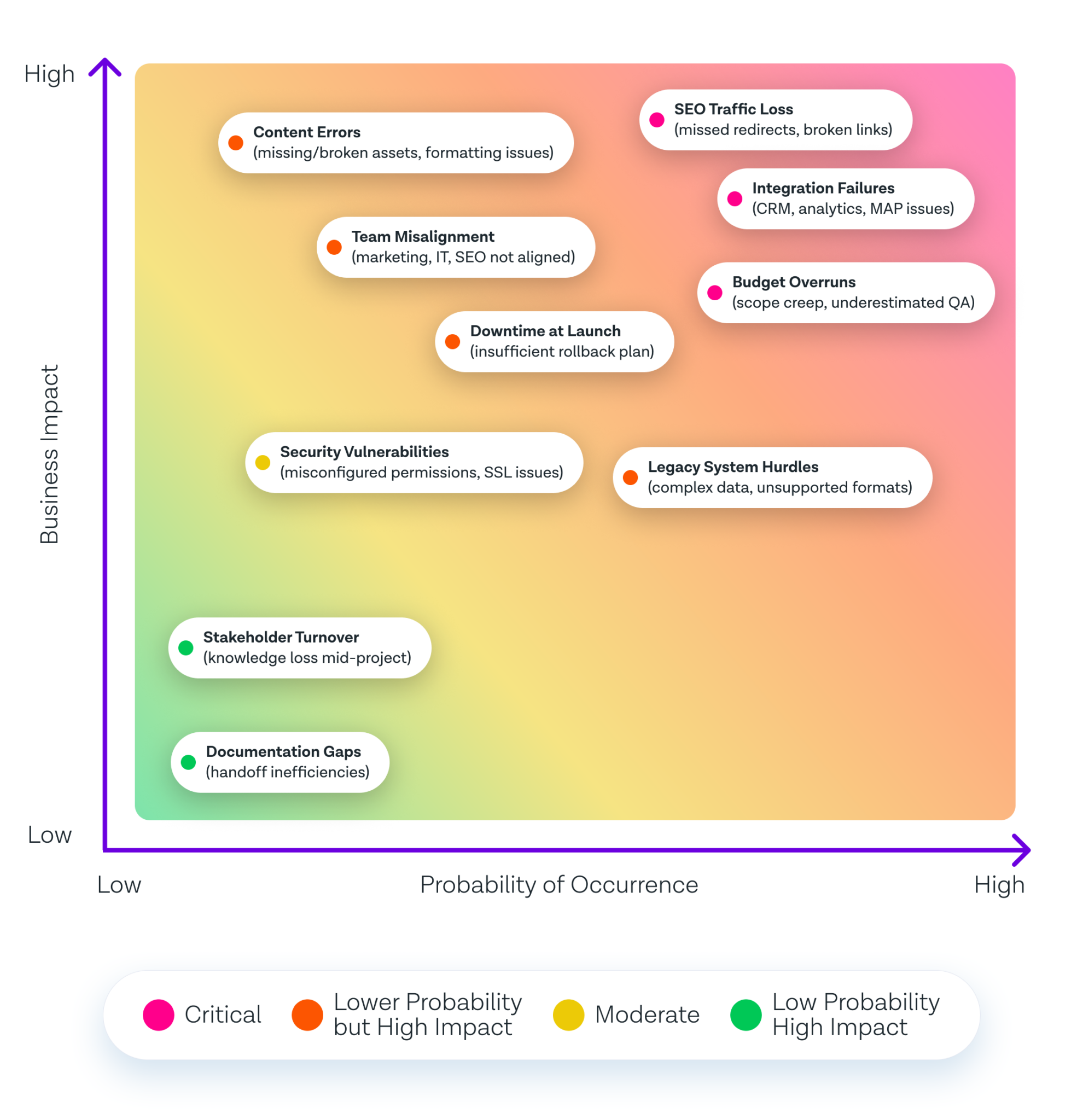
◉ High Probability / High Impact Risks
- SEO Traffic Loss (missed redirects, broken links)
- Integration Failures (CRM, analytics, MAP issues)
- Budget Overruns (scope creep, underestimated QA)
◉ Medium Risks
- Content Errors (missing/broken assets, formatting issues)
- Team Misalignment (marketing, IT, SEO not aligned)
- Downtime at Launch (insufficient rollback plan)
- Budget Overruns (scope creep, underestimated QA)
◉ Lower Probability but High Impact
- Security Vulnerabilities (misconfigured permissions, SSL issues)
◉ Lower Probability & Lower Impact
- Stakeholder Turnover (knowledge loss mid-project)
- Documentation Gaps (handoff inefficiencies)
Before You Start: Align Goals Across Teams
Before you even talk platforms or timelines, you need clarity.
Define your business objectives
Is the goal performance? Scalability? Better content workflows? Aligning on “why” helps you prioritize features and avoid scope creep.
Involve IT, SEO, and marketing early
This isn’t just a marketing project. Your CMS touches security, analytics, SEO, and dev workflows. Bring all voices in early to prevent rework later.
Audit your existing CMS and content
What’s working? What’s outdated? Run a full content inventory and performance audit. This shapes what stays, what gets revised, and what gets retired.
The Enterprise CMS Migration Checklist
Here’s your step-by-step breakdown:
1. Strategy & Assessment
Set Migration Objectives
Define clear goals for your CMS migration. Are you aiming for better performance, easier content management, improved security, or all of the above? Align on priorities with stakeholders from the start.
Conduct a Content Audit
Review all digital assets: pages, images, PDFs, videos, and other media. Identify what to keep, update, archive, or remove. This helps reduce clutter and improves migration efficiency.
Deep-Dive Into Requirements
Document your technical, business, and compliance needs—such as localization, workflows, accessibility, integration support, and scalability.
Assemble a Cross-Functional Migration Team
Bring together IT, marketing, content owners, compliance, and security teams. CMS migrations touch every function—early alignment prevents last-minute blockers.
2. Planning
Select the Right CMS Platform
Evaluate CMS platforms based on flexibility, scalability, customization, ease of use, and integration capabilities. Factor in future growth.
Inventory Integrations and Dependencies
List all tools that connect with your current CMS—CRMs, analytics, eCommerce, MAPs, and more. Plan how they’ll be integrated post-migration.
Develop a Migration Roadmap
Map out key milestones, responsibilities, deadlines, and communication cadences. Include risk management steps and rollback protocols.
Determine Content Structure & Governance
Audit your current IA and plan enhancements. Define new navigation models, taxonomy structures, tagging systems, and approval workflows.
3. Pre-Migration Preparations
Back Up Everything
Create secure, versioned backups of your CMS, content, and database assets before you touch a single line of code.
Set Up the New Environment
Deploy the new CMS in a staging environment that mirrors production. Configure foundational settings, themes, and modules.
Establish User Roles and Permissions
Set role-based permissions to enforce compliance, minimize risk, and streamline publishing processes.
Prep Content for Migration
Remove outdated pages, fix broken links, and clean up metadata. Standardize formats and write scripts if automating the migration.
4. Migration Execution
Start with a Pilot Migration
Test the process by migrating a sample batch of pages, users, and assets. Use findings to refine your full migration plan.
Full Content Migration
Migrate all approved content, assets, and metadata. Retain relationships, folder structure, and SEO settings.
Data Integrity Checks
Verify that all links work, content renders correctly, and assets are intact. Check redirects, URL formats, and internal search functionality.
Integrate Third-Party Services
Reconnect analytics, CRM, marketing automation, personalization tools, and other mission-critical services.
5. Testing & QA
Functional Testing
Ensure that forms, navigation, filters, search, and other front-end features function as expected across devices.
User Acceptance Testing (UAT)
Involve content editors and stakeholders in hands-on testing. Confirm workflows, publishing rights, and content updates operate smoothly.
Performance & Security Testing
Run load tests, page speed audits, and vulnerability scans. Validate SSL setup, access controls, and system permissions.
SEO & Analytics Validation
Check 301 redirects, canonical tags, meta data, schema markup, robots.txt, and analytics tracking. Submit the updated sitemap to search engines.
6. Training & Documentation
User Training
Host live training sessions and build onboarding resources tailored to content authors, editors, and administrators.
Documentation Update
Document new workflows, publishing steps, approval chains, and troubleshooting procedures.
7. Launch
Develop a Detailed Launch Plan
Outline launch roles, timing, contingencies, and real-time monitoring steps. Test failovers and rollback plans.
Communicate with Stakeholders
Share the go-live timeline, known issues, and points of contact. Set expectations for post-launch support.
Switch DNS and Go Live
Coordinate with your IT or hosting team to go live. Monitor the switch closely and document any anomalies.
8. Post-Migration Activities
Monitor and Support
Closely monitor site performance, indexation, uptime, and user-reported bugs. Set up dashboards for key metrics.
Fix and Optimize
Quickly resolve post-launch issues. Prioritize optimizations based on user feedback and analytics insights.
Ongoing Maintenance
Schedule regular audits, backups, updates, and training refreshers to keep your CMS environment running smoothly.
When Should An Enterprise Consider External Help for CMS Migration
An enterprise should consider bringing in external help for CMS migration or setup in the following key situations:
- Complexity of the Enterprise Environment: If the CMS migration involves complicated data structures, numerous integrations, custom workflows, or legacy systems, external experts bring crucial experience to navigate these complexities and reduce risk.
- Lack of In-House Expertise or Resources: When internal teams do not possess the specialized skills required for migration—including technical CMS knowledge, SEO preservation, security, or project management—external help fills these critical gaps to ensure project success and timely delivery.
- Risk Mitigation and Contingency Planning: Experienced migration partners bring robust rollback plans, extensive testing, quality assurance processes, and contingency protocols that mitigate the chances of costly downtime or migration failures.
- Cross-Functional Coordination: Large migrations involve coordination across business units such as IT, marketing, legal, and security. External consultants serve as effective integrators to align these stakeholders toward unified migration goals.
- Post-Migration Support and Optimization: Many external providers offer ongoing services such as performance tuning, security monitoring, user training, and platform optimization critical for long-term CMS success.
- Cost Control and Governance: Engaging specialists can actually reduce overall costs by preventing scope creep, managing deliverables tightly, and avoiding internal resource overruns.
A CMS migration doesn’t have to be painful. With the right prep—and a checklist built from real enterprise projects—you’ll launch faster, avoid common pitfalls, and get back to driving results.