Migrating your CMS isn’t just a technical project—it’s a business-critical initiative. Many enterprise teams face the same problem: their legacy CMS slows down global site launches, campaign timelines slip, regional teams bypass governance controls, and SEO rankings suffer.
When that tipping point hits, the solution often points toward modern platforms like Contentful. But here’s the challenge—without a structured roadmap, migration can quickly turn from a strategic advantage into a costly detour.
If you’re facing a similar challenge, you’re not alone. Enterprises often underestimate the complexity of CMS migrations, especially when it involves global sites, thousands of assets, and cross-functional stakeholders.
This Contentful migration checklist will walk you through everything you need to know: from step-by-step execution, to pitfalls to avoid, and a ready-to-use checklist you can share with your web strategy team.
Common Challenges Teams Face During a Contentful Migration
| Challenge | Example Scenario | Impact on Teams |
|---|---|---|
| Content chaos | A global SaaS company realizes halfway through migration that regional teams have been storing campaign assets in separate drives. Duplicate product pages, inconsistent metadata, and missing translations force weeks of cleanup before content can be imported into Contentful. | Marketing teams lose time reconciling content, project timelines slip, and launch momentum is delayed. |
| SEO disruption | A B2B enterprise migrates thousands of blog posts but fails to implement proper redirects. Overnight, their high-performing resources page loses traffic, costing them both leads and paid media efficiency. Search rankings take months to recover. | Demand generation suffers, organic traffic dips, and paid media budgets are wasted trying to replace lost visibility. |
| Integration gaps | An enterprise retailer launches their new Contentful site only to discover that CRM form data isn’t flowing into Salesforce. Marketing automation stalls, customer leads are lost, and the dev team scrambles to patch integrations post-launch. | Sales teams miss opportunities, marketing reporting breaks, and developers face fire-drill fixes that increase costs. |
| Stakeholder misalignment | During migration, IT builds a content model optimized for speed, while marketing assumes it will mirror the old CMS’s structure. Compliance later steps in with additional approval requirements. The lack of alignment delays launch by an entire quarter. | Internal friction grows, accountability blurs, and leadership confidence in the migration project erodes. |
| Overengineered models | Developers design a hyper-granular content model with dozens of nested fields. While technically impressive, marketers struggle to publish even a basic landing page without developer help defeating the purpose of moving to a headless CMS. | Marketers lose agility, dependence on developers increases, and the CMS becomes a bottleneck rather than an enabler. |
Step-by-Step Contentful Migration Checklist
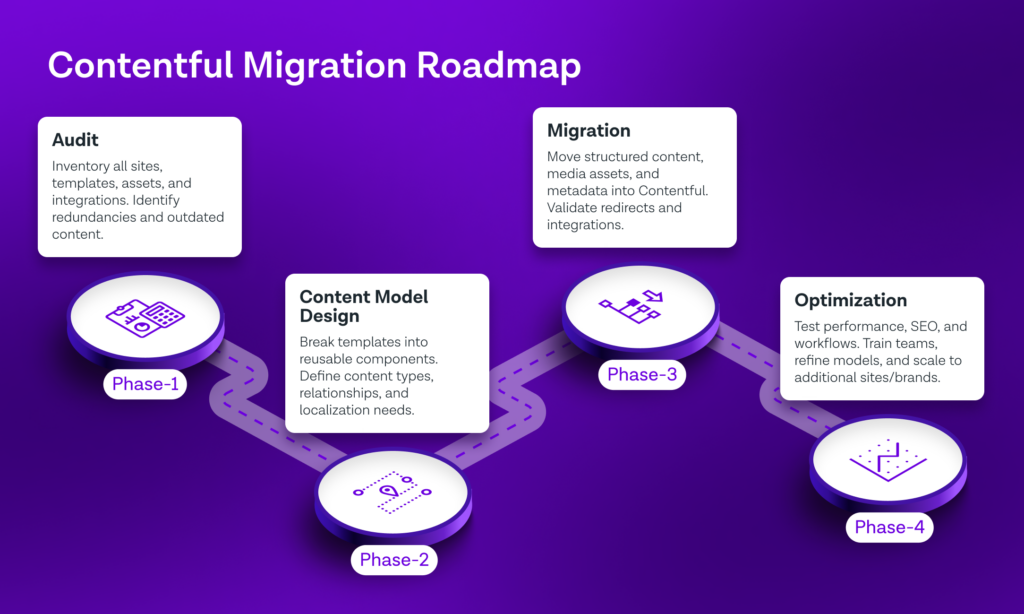
Step 1 – Audit Your Current CMS Landscape
Before any migration planning begins, enterprises need a clear map of their existing CMS ecosystem. Without this, migrations often uncover hidden complexities too late—leading to budget overruns, missed deadlines, or technical debt carried into the new system.
Why the Audit Matters
1. Reveals Scope & Complexity
Many organizations underestimate the number of sites, content types, and integrations they actually have. What starts as “one corporate website” often turns into a sprawl of microsites, campaign pages, regional subsites, and product-specific portals. An audit surfaces the true scope so leaders can plan realistically.
2. Prevents Content Debt from Carrying Over
Migrating everything “as is” risks bringing years of outdated, duplicate, or inconsistent content into your new platform. A thorough audit identifies what should be retired, rewritten, or consolidated before migration.
3. Aligns Stakeholders on Priorities
An audit creates a shared understanding between IT, marketing, design, and compliance. It’s not just about counting pages—it’s about uncovering where bottlenecks exist today and setting priorities for the future.
4. Informs Content Modeling in Contentful
Contentful relies on structured content models. If you don’t know your current templates, workflows, and taxonomy, you’ll struggle to design reusable components that fit real-world needs.
What to Audit
1. Content Inventory
- Number of pages, articles, product descriptions, case studies, and assets.
- Metadata usage (titles, descriptions, schema).
- Existing taxonomy: categories, tags, or navigation structures.
2. Templates & Layouts
- Identify how many unique templates exist (e.g., blog, landing page, product detail page).
- Flag inconsistencies (e.g., seven versions of a blog template across regions).
- Note hard-coded elements that should become reusable components.
3. Systems & Integrations
- CRM (Salesforce, HubSpot, Microsoft Dynamics).
- Marketing automation (Marketo, Pardot).
- Analytics & personalization engines.
- Media management (DAMs, Cloudinary, Akamai).
4. Governance & Workflows
- Current roles and permissions (Who can publish? Who reviews?).
- Regional/local workflows for approvals.
- Bottlenecks that slow down publishing cycles.
5. Technical Debt
- Legacy code or plugins that can’t migrate.
- Custom modules with no documentation.
- Security or compliance risks embedded in old content.
Step 2 – Define Governance & Roles
Governance ensures that content operations scale without chaos. In a legacy CMS, publishing may already be slow or fragmented. If those same issues are carried into Contentful without clear governance, the new platform won’t solve bottlenecks—it will amplify them.
Without governance, enterprises face:
- Shadow publishing: Teams bypass workflows and push unapproved content live.
- Compliance risks: Regulated industries (finance, healthcare) publish content without the right approvals.
- Brand inconsistency: Regions or business units create their own templates and tone, fragmenting the brand.
- Role confusion: Developers, marketers, and legal teams overlap responsibilities, leading to delays or finger-pointing.
Good governance transforms Contentful from a CMS into a content operations hub where everyone knows their role, approvals are streamlined, and compliance is built in.
Key Elements to Cover in Governance
1. Executive Sponsorship
- A senior leader who aligns the project with business goals and secures budget.
- Keeps cross-functional teams accountable and shields the project from scope creep.
2. Content Ownership & Roles
- Define who owns what: global vs. regional, business unit vs. corporate.
- Assign product owners, content strategists, and editors for each major content type.
3. Approval Workflows
- Establish structured reviews: draft → review → legal/compliance (if required) → publish.
- Tailor workflows for different content types (e.g., marketing campaign vs. product documentation).
4. Permissions & Access Control
- Leverage Contentful’s role-based access to limit who can edit, approve, and publish.
- Prevents errors like junior marketers accidentally unpublishing global pages.
5. Localization & Regional Governance
- Define how global content cascades to regions.
- Set translation workflows and local compliance checks to avoid inconsistent messaging.
6. Change Management Process
- Document how content models, templates, or integrations can be updated.
- Ensures changes don’t break live sites or disrupt other teams.
7. Documentation & Training
- Provide a clear governance playbook (roles, workflows, escalation paths).
- Train new team members so governance scales as the organization grows.
Step 3 – Design Content Models in Contentful
This is the heart of the migration. Moving to Contentful isn’t just about lifting and shifting content — it’s about transforming content into structured, reusable, and scalable components that empower both marketers and developers.
Here’s the in-depth transformation plan:
Step 3.1 – Translate Old Templates into Components
- What to do: Break down existing templates (e.g., landing page, product detail page, blog post) into smaller reusable blocks.
- Why it matters: Legacy CMS platforms often lock design and content together. In Contentful, separating these unlocks true flexibility.
Step 3.2 – Define Core Content Types
- What to do: Identify the universal building blocks that power your site. Typical enterprise types include:
- Page (with localized variants)
- Article/Blog Post
- Product/Service Module
- Testimonial/Case Study
- Event/Resource
- Why it matters: Establishing clear, core types avoids duplication later and standardizes publishing workflows.
Step 3.3 – Map Fields & Relationships
- What to do: For each content type, define fields (e.g., Title, Body, SEO Metadata, Tags, Media). Use references to link related content (e.g., Product → Case Studies → Testimonials).
- Why it matters: Content relationships ensure consistency. Update one product description, and it cascades across landing pages, resource hubs, and partner portals.
Step 3.4 – Build for Localization & Multi-Brand Needs
- What to do: Enable localization fields for regions and languages. Build structures flexible enough to support multiple brands or business units.
- Why it matters: Enterprises rarely manage just one website. Designing for scale upfront avoids costly retrofits later.
Step 3.5 – Balance Flexibility with Control
- What to do: Empower marketers with modular building blocks, but set guardrails to avoid brand drift.
- Why it matters: Too much freedom leads to inconsistency; too much rigidity frustrates non-technical teams.
- How to balance:
- Define locked-down “core” modules (headers, footers, brand CTAs).
- Allow flexible marketing modules (text/image blocks, carousels, testimonials).
Step 3.6 – Prototype & Validate in Sandbox
- What to do: Build the content model in a Contentful sandbox space. Populate it with real-world content.
- Why it matters: Theory often breaks in practice. Prototyping ensures workflows, permissions, and relationships work before rollout.
Step 3.7 – Document the Content Model
- What to do: Create a governance guide with diagrams of each content type, fields, and relationships.
- Why it matters: New team members and agencies will use Contentful. Without documentation, they’ll rebuild models inconsistently.
Step 3.8 – Roll Out in Phases
- What to do: Don’t migrate everything at once. Start with a high-value area (e.g., blog, resource hub), refine your content model, then scale.
- Why it matters: Early wins build confidence and reveal adjustments before the full migration.
Step 4 – Migrate Content & Assets
| # | Step | What to do (Process) | Key milestones | Common challenges |
|---|---|---|---|---|
| 1 | Confirm scope & inventory lock | Freeze the source-of-truth inventory of pages, entries, assets, locales, and sites that are in-scope for the first release. |
| Scope creep late in project; hidden microsites; missing asset lists; “we might also move X.” |
| 2 | Prepare environments & spaces | Create Sandbox → Staging → Production spaces in Contentful; align environments/branches on the frontend. |
| Inconsistent permissions; shared tokens; no separation of concerns causing risky tests in prod. |
| 3 | Map content types & fields | Map legacy templates/DB fields to Contentful content types and fields (IDs, slugs, references, Rich Text). Define transforms. |
| One-off legacy fields; HTML blobs needing cleanup; missing required fields; reference loops. |
| 4 | Plan asset strategy | Decide where assets live (Contentful Assets vs DAM). Prepare an asset manifest with URL → new ID mapping and alt-text rules. |
| Duplicate assets; huge files; broken EXIF/title/alt text; uncompressed images hurting CWV. |
| 5 | Build migration tooling | Write import/export scripts using Contentful CLI/Management API. Include retries, throttling, and detailed logs. |
| API rate limits; non-deterministic IDs; partial imports with no rollback; weak logging. |
| 6 | Authoring guardrails | Configure roles, permissions, validations, and editor interfaces so imports won’t fail (required fields, regex, max lengths). |
| Imports blocked by strict validations; editors able to modify during test runs. |
| 7 | SEO & redirects plan | Generate a URL mapping (old → new). Prepare 301 rules, canonical/meta rules, Open Graph, and structured data mapping. |
| Missed long-tail URLs; query-string nuances; duplicate canonicals; loss of schema markup. |
| 8 | Dry Run #1 (Sandbox) | Import a representative sample (5–10%) including edge cases and all content types. Validate script behavior and data shape. |
| Rich Text breaks; embedded entries missing; timezone & date parsing issues. |
| 9 | Data integrity checks | Compare source vs target counts, references, locales, and field completeness. Automate diff reports. |
| Off-by-one locale issues; orphaned entries; truncated fields; character encoding problems. |
| 10 | Dry Run #2 (Staging, full set) | Run a full import in staging. Connect integrations (search, forms, analytics). Run lighthouse/CWV & accessibility checks. |
| Integrations not receiving IDs/events; slow asset delivery; accessibility regressions. |
| 11 | UAT & sign-off | Business users validate page renders, search, filters, forms, personalization, and localization. Capture defects and resolve. |
| “Looks different” feedback vs spec; local fallbacks; governance gaps discovered late. |
| 12 | Content freeze & delta plan | Announce authoring freeze on legacy CMS. Capture deltas (new posts/edits) between last dry run and cutover. |
| Teams keep editing legacy; missed deltas; parallel work causing content divergence. |
| 13 | Production migration (cutover) | Execute production import(s). Import entries → assets → references in correct order. Apply redirects. |
| API throttling under load; long-running jobs time out; missed reference rebuilds. |
| 14 | Smoke test & rollback window | Validate core journeys: home → product → resource → form; robots, sitemaps, and analytics. Keep a short rollback window. |
| Post-go-live surprises; DNS/edge cache propagation; robots.txt wrong environment. |
| 15 | Post-migration QA & monitoring | Monitor logs, 404s, redirect chains, search console, CWV, and error budgets. Patch issues fast. |
| Long redirect chains; missed vanity URLs; image CDN misconfigs; traffic seasonality masking issues. |
| 16 | Authoring enablement | Train authors on the new model, entry types, and workflows. Provide quick-start guides and video snippets. |
| Editors recreate “old CMS” habits; misuse of flexible modules; permissions too lax/strict. |
| 17 | Decommission & archive | Turn off legacy write access; export archives; document retention & legal hold policies; retire DNS. |
| Shadow sites lingering; compliance not consulted; broken bookmarks post-retire. |
| 18 | Optimize & iterate | Use analytics and editor feedback to refine models, validations, and performance. Plan next waves (brands/locales). |
| Over-customizing; skipping governance updates; tech debt from “temporary” workarounds. |
Step 5 – Integrate Systems & Workflows
Contentful shines when it plays well with others.
- CRM integrations (Salesforce, HubSpot).
- Analytics (GA4, Segment, Amplitude).
- Personalization engines (Optimizely, LaunchDarkly).
Step 6 – Test for SEO, Performance, and UX
- Redirect old URLs to maintain SEO rankings.
- Test Core Web Vitals performance.
- Validate global localization rules.
Step 7 – Train Teams & Launch with Confidence
- Conduct training for marketers, designers, and developers.
- Provide quick-reference guides for daily workflows.
- Roll out in phases (e.g., blogs first, then product pages).
The Most Overlooked Pitfalls in Enterprise CMS Migrations
| Pitfall | Why It Happens | Implications / Consequences |
|---|---|---|
| Underestimating migration complexity | Teams assume a CMS migration is a simple content transfer rather than a complete rebuild of architecture, workflows, and integrations. Discovery and planning phases are rushed to meet aggressive timelines. | Projects run over budget and behind schedule. Unexpected dependencies emerge mid-migration, leading to rework, technical debt, and stakeholder frustration. |
| Breaking SEO during launch | Redirects, metadata, and schema are treated as “post-launch tasks.” SEO audits are often skipped due to time pressure or siloed ownership between marketing and dev teams. | Massive drops in organic traffic, lost rankings for high-value keywords, and reduced lead flow immediately after launch. Recovery can take months and hurt brand visibility. |
| Overcomplicating content models | Developers over-engineer schemas with excessive nesting and unnecessary content types, trying to future-proof the system. | Authors face steep learning curves, publishing speed slows down, and the CMS becomes hard to maintain—undermining the flexibility Contentful is meant to provide. |
| Poor stakeholder alignment | Marketing, IT, and Legal work in silos, each defining priorities without shared visibility. Leadership assumes alignment exists because meetings are held—but not decisions documented. | Conflicting goals lead to constant scope changes, unclear ownership, and finger-pointing. Delays multiply as approvals and rework pile up. |
| Neglecting governance and permissions | To speed things up, everyone is given high-level access during migration. Role definitions and workflows are left “for later.” | Accidental publishing errors, compliance risks, and inconsistent brand voice across regions. Once issues surface, it’s far harder to enforce governance retroactively. |
| Skipping integration testing | Teams assume existing APIs and connectors will “just work” in the new architecture. Integration validation is postponed to late-stage QA. | Launch-day breakdowns—forms not submitting, CRM syncs failing, or analytics not tracking—leading to operational chaos and loss of campaign data. |
| Rushing content migration | Tight deadlines push teams to use automated migration scripts without quality control. There’s little time for manual validation or cleaning data. | Broken internal links, formatting errors, and misplaced assets go live. Post-launch cleanup consumes more time than the migration itself. |
| Ignoring performance optimization | Migration focuses on structure and content, not delivery performance. Image optimization, caching, and CDN setup are deferred. | Slow page loads damage user experience, increase bounce rates, and negatively affect SEO rankings—especially for global audiences. |
| Inadequate author training | Teams assume Contentful’s UI is intuitive and skip structured onboarding for content authors. Documentation is an afterthought. | Low adoption, poor data entry, and recurring support requests from marketing teams. CMS potential is underutilized and efficiency gains never realized. |
| Treating migration as a one-time project | Once launched, attention shifts to other initiatives. No ownership is assigned for optimization or iteration. | Content models become outdated, workflows drift, and performance declines. The organization falls back into the same inefficiencies the migration aimed to solve. |
Actionable Takeaways
Here’s your Contentful Migration Checklist:
- Audit current sites, content, and integrations.
- Define roles, workflows, and governance.
- Design scalable Contentful content models.
- Migrate structured content and assets carefully.
- Integrate with CRM, analytics, personalization.
- Test for SEO, performance, and UX.
- Train teams and phase your rollout.
Contentful migration is more than a technical exercise—it’s a business transformation. With the right checklist, you can avoid risks, empower your teams, and accelerate global web operations.
Schedule a CMS consultation with eight25Media to see how our proven playbooks can guide your migration from start to finish.