
When enterprise teams move from a coupled CMS like Sitecore to a headless platform like Contentstack, most of the technical conversation centers on the platform itself — APIs, integrations, deployment architecture. The content model tends to get less attention until it becomes a problem.
At scale, that’s a costly sequence. Organizations managing content across multiple regions, brands, or product lines don’t have the runway to rebuild a poorly designed model six months into production. Getting it right early is what determines whether a headless build delivers the operational flexibility it was adopted to create — or simply replicates the constraints of the system it replaced.
What Modular Content Modeling Actually Means
In a traditional coupled CMS, content is structured around pages. A “homepage” content type has fields for a hero, a feature section, a CTA block — all bundled together. The model mirrors the layout, and the layout owns the content.
In a headless build, the goal is to separate content from presentation entirely. A modular content model does this by breaking content into small, reusable types — components that can be assembled into pages, rather than content types that represent pages. The same component can be rendered across web, mobile, regional microsites, or partner portals without duplication.
A “Hero” becomes its own content type. So does a “Testimonial,” a “Feature Card,” a “Rich Text Block.” Each one has defined fields and governance rules, and those components can be referenced across multiple page templates, surfaces, and markets.
For enterprise organizations, this distinction matters beyond architecture. It’s the difference between a content operation that scales with the business and one that creates bottlenecks every time a new market, campaign, or product line is added.
How a Modular Model Is Structured
A well-built modular content model operates on two levels: components and templates (sometimes called entries and compositions, depending on the platform).
Components are the atomic units — individual content types with their own fields. A Testimonial component might have fields for quote text, attribution, company name, and an optional headshot. It’s defined once, governed centrally, and reused across any surface that needs it.
Templates (or page-level types) are the containers. They don’t duplicate fields — they reference components. A Landing Page template might have a required Hero slot, an optional Features block, and a repeating Testimonial section. The template defines structure; the components provide the content.
For organizations running multi-brand or multi-region architectures, this separation becomes critical. A global component library — maintained by a central digital team and referenced by regional editors — is only possible when the model is built this way from the start.
A few structural decisions carry significant downstream weight:
- Field-level decisions — What’s required vs. optional? What has character limits? For global deployments, these decisions also intersect with localization — which fields are translatable, which are market-specific, which are universal.
- Reference vs. embed — Referenced entries are reusable and centrally governable. Embedded content is unique to a single instance. Enterprise models lean heavily toward references for content that has organizational ownership — legal disclaimers, product specifications, compliance language.
- Content vs. configuration — Layout options, display variants, and behavioral flags are configuration decisions, not content. Mixing the two creates model complexity that compounds as the team and content volume grow.
A Worked Example — Modeling a Use Case Accordion
Take this UI pattern: a section with a headline, a CTA button, and a list of expandable use case items — each one a label with a linked arrow.
![Solutions to your security challenges — accordion UI component]
It looks simple. But how you model it in Contentstack has real downstream consequences for editorial teams operating at scale.
The wrong approach is to build a single content type called “Solutions Section” with a fixed set of text fields — Heading, Button Label, Button URL, Item 1, Item 2, Item 3. Editors can update copy, but adding a seventh item requires developer involvement. Reusing one of those items across a regional variant or a campaign page requires manual duplication — and creates a maintenance surface that grows every time something needs to change.
The modular approach breaks this into two content types with a reference relationship.
How It’s Modeled vs. How It Renders
| Content Model (Contentstack) | Field / Structure | What the Editor Sees / Front-End Renders |
|---|---|---|
| Solutions Section (Content Type) | Parent container for the entire UI section | Full “Solutions” section on the page |
| Heading (Short Text) | Editable text field | Section heading (e.g., “Solutions to your security challenges”) |
| CTA Label (Short Text) | Button text | CTA button label (e.g., “See all use cases”) |
| CTA URL (URL) | Link destination | Button click destination |
| Use Cases (Multi-Reference Field) | References multiple Use Case entries | Accordion list displayed below the heading |
| Use Case Item (Referenced Content Type) | Individual reusable item | Each expandable accordion row |
| Label (Short Text) | Editable text field | Use case title (e.g., “Stop ransomware attacks”) |
| URL (URL) | Link destination | Arrow link or row destination |
The reference field is what makes it modular. An editor can add, remove, or reorder items without a developer. Each Use Case Item exists as its own independent, governable entry — which matters significantly when multiple teams or markets need access to the same content.
How a Second Page References the Same Items
Say your Security Products page also needs a “Stop ransomware attacks” use case — same label, same destination. In a page-based model, an editor copies the text manually into a new field. Two entries. Two things to update when messaging changes, multiplied across every market running a localized variant.
In the modular model, the Security Products page simply points to the same Use Case Item entries already in the system.
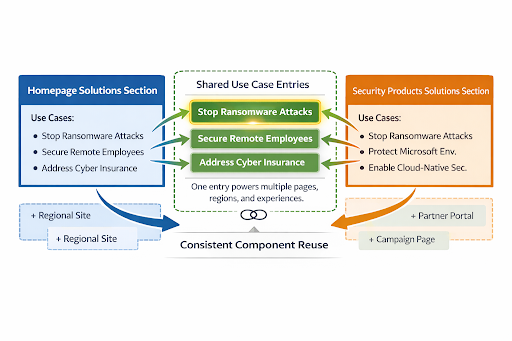
When the “Stop ransomware attacks” label or URL changes — whether driven by a brand refresh, a compliance update, or a messaging shift — an editor updates it once. Every page, region, and surface referencing that entry reflects the change automatically. At enterprise scale, that’s not a minor efficiency. It’s the difference between a content operation that can respond to change quickly and one that requires a coordinated manual effort every time something shifts.
Field-Level Decisions Worth Making Explicitly
A few choices on this component that surface consistently in enterprise implementations:
Does the Use Case Item need a description field? If the accordion expands to reveal body copy, add it as an optional rich text field. For global deployments, flag it as translatable from the start — retrofitting localization fields into an established model is significantly more disruptive than building for it initially.
Should the CTA be a reference or inline fields? Organizations with established brand and legal governance over CTA language benefit from a standalone CTA component — one that’s owned, approved, and referenced rather than re-entered by individual editors. If this is a one-off pattern with no governance requirements, inline fields are simpler.
What about display variants — background color, layout orientation? Configuration fields, not content fields. A dropdown or boolean that controls visual behavior belongs in the model but should be explicitly separated from editorial fields. At scale, this distinction matters for permissioning — content editors shouldn’t need to navigate configuration options, and configuration shouldn’t be exposed as content.
Where Teams Typically Get Stuck
The most common friction point in enterprise headless implementations is over-modeling — building too many content types too early, often because the team is trying to recreate their existing information architecture rather than rethinking it for a headless context.
A model with 80 content types before a single page has launched is typically a signal that the team modeled from their current site map rather than from their actual content patterns. The two rarely align as closely as they appear.
A more organizationally complex problem: governance gaps. A modular model only works if components are actually reused — which requires editors across teams, regions, and time zones to know what exists, what it’s for, and when to create something new versus reference something already in the system. Without that clarity built into the model itself — through naming conventions, help text, and editorial training — content sprawl becomes the default outcome regardless of how well the architecture was designed.
We also see enterprise teams treat the content model as a one-time deliverable handed off at the start of a project. In practice, it’s a living structure. An initial model should cover core use cases without over-anticipating future needs. The platform’s flexibility is an advantage precisely because the model can evolve — but that requires a process for making those decisions deliberately rather than reactively.
What the Migration from a Coupled CMS Changes About Your Model
Organizations migrating from Sitecore — particularly those with mature, heavily customized implementations — typically discover that their existing content model is more tightly coupled to presentation logic than they realized.
The Sitecore presentation layer has often been absorbing complexity that now needs to live somewhere else. What a developer configured through rendering parameters becomes a field choice an editor makes. What lived in inline rich text needs to become structured data. These aren’t blocking issues, but they’re scope — and they need to be planned for explicitly.
A few patterns that come up consistently across enterprise Sitecore migrations:
Rendering parameters become component variants. Layout variations that were controlled by developers through Sitecore’s presentation layer need to be expressed differently in a headless model — as content fields, configuration flags, or front-end logic. The decision about where that lives has implications for who owns it operationally.
Inline content becomes structured data. Rich text fields that contain embedded images, tables, and formatted content are common in legacy implementations. Headless models perform better — and localize more cleanly — when content is structured: a separate image field, a separate caption field, a separate pull-quote field. Migration is the right moment to make that structural investment, but it adds scope that needs to be accounted for in the project plan.
Workflow and permissions require a dedicated workstream. Enterprise Sitecore implementations often have sophisticated approval chains, role-based access, and publishing workflows built up over years. Contentstack’s workflow and permissions system is capable, but it’s configured differently. Mapping existing workflows to the new platform should run in parallel with content modeling — not as a follow-on task.
How to Evaluate Whether a Model Is Working
A content model doesn’t declare success at launch. For enterprise organizations, the real test comes as the team scales — new markets, new campaigns, new product lines added to a system that’s now in production.
Four indicators that the model is holding up under that pressure:
How to Evaluate Whether a Content Model Is Working
| Evaluation Indicator | What Good Looks Like | Warning Signs / What It Means |
|---|---|---|
| Editorial independence | Editorial teams can publish and manage standard content without routine developer involvement. | Regional editors frequently open development tickets to add content or adjust components — a sign of structural gaps that will grow over time. |
| Component reuse | Reuse is measurable and increasing. Editors reference existing components instead of recreating them. | New entries are created for every page, indicating poor governance or a model that doesn’t support reuse as intended. |
| Template flexibility | New page types or regional campaigns can be assembled using existing components without rebuilding the system. | Each new initiative requires new components or development work, signaling weak separation of concerns. |
| Model legibility | Content types, field labels, and in-platform guidance make the model understandable for new editors or developers. | Teams rely on tribal knowledge or documentation outside the CMS, slowing onboarding and increasing operational risk. |
A model that holds up on all four is one the organization can build on with confidence — not one it will need to refactor the first time business requirements expand.
The content model is upstream of nearly everything else in a headless implementation. For enterprise organizations, the decisions made at this stage — about structure, governance, reuse, and localization — compound across every market, channel, and team that touches the platform. It warrants the same level of strategic investment as the technology selection that preceded it.